Blog
Windows Security App Gains Secure Boot Certificate Status Ahead of Major Certificate Refresh

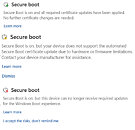
The badge system is simple yet significant. A green checkmark indicates that the new certificates are installed and no further action is needed. A yellow caution badge, which will start appearing in May 2026, means the update is either pending or has been blocked by a hardware or firmware limitation. A red stop icon is the most serious state and could appear as early as June 2026, once older certificates start expiring. When this occurs, the device will no longer be able to receive critical boot-level security updates. The same status is reflected in the Windows Security system tray icon, so warnings are visible even when the app is closed.
For most users, the process is automatic, and keeping Windows Update active is all that is required. Devices from 2025 are largely covered, and most 2024 hardware has been addressed as well. Older machines will be updated gradually, with major OEMs providing firmware guidance as needed. Microsoft directs users who encounter issues to aka.ms/getsecureboot for further assistance. While it is technically possible to dismiss the yellow or red warnings, Microsoft advises against it, as devices without the updated certificates are left in a degraded security state, making them more vulnerable to boot-level exploits and potentially incompatible with future Windows security patches.