Blog
Build Your Next Website With Divi AI Agents With 70% Off This Black Friday


Rebuilding a website reference section by section can swallow the time you meant to spend finishing the project. Before you have a first draft, you’re arranging layouts, tracking down photos, and filling empty spaces.
With Divi AI Agents, you can hand over a screenshot and a brief, then refine an editable Divi 5 layout. The Agent handles the initial assembly while you guide the design.
Our Black Friday Sale brings Divi AI down by 70%, with Agent access and a $5 monthly Agent balance included. See how that workflow takes Rivermere from a reference image to a page you can keep shaping, then put it to work on your next project.
Get Divi AI At 70% Off
See What Your Next Website Could Become
For this example, the starting point is Rivermere, a fictional architecture studio. The reference pairs contemporary buildings with clean typography, open white sections, and a prominent project gallery.
Visitors can explore the studio’s projects, learn about its practice, and find the contact section in one page. The same thinking applies to a photographer’s portfolio, a consultancy, or your next client website.
Rivermere’s homepage brings those pieces together in eight native Divi sections. The full-width hero leads into the studio’s strengths, three featured projects, an introduction to the practice, services, and a closing inquiry area. Forest-green buttons and accents carry through the page.
The photographs are newly generated, and the page has its own spacing and header treatment. The design gives us something to shape in Divi.
Attach A Reference And Write Your Prompt
A reference image shows the Agent how to balance text and photography, space sections, and style project cards.
For Rivermere, the image defines the layout while the prompt asks for specifics like forest-green accents and separate photos that can be edited or replaced later.
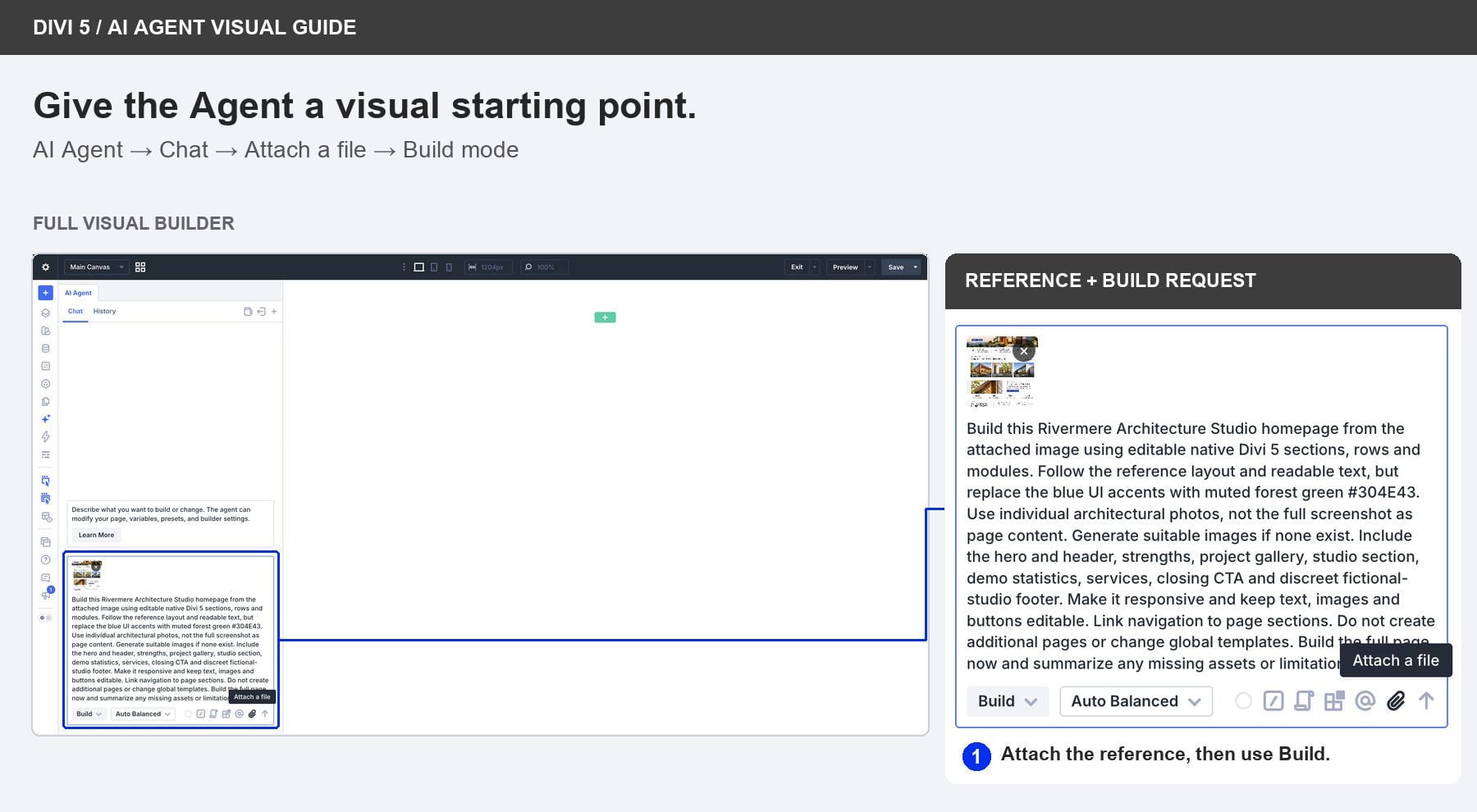
Be explicit about what the reference is for: it shows the design direction, while the individual photos become assets on the actual page. Here’s the request used for this build.
Build this Rivermere Architecture Studio homepage from the attached image using editable native Divi 5 sections, rows and modules. Follow the reference layout and readable text, but replace the blue UI accents with muted forest green #304E43. Use individual architectural photos, not the full screenshot as page content. Generate suitable images if none exist. Include the hero and header, strengths, project gallery, studio section, demo statistics, services, closing CTA and discreet fictional-studio footer. Make it responsive and keep text, images and buttons editable. Link navigation to page sections. Do not create additional pages or change global templates. Build the full page now and summarize any missing assets or limitations.
For your own project, describe the business and what you want visitors to do, then tell the Agent which details in the reference to preserve. That gives you a brief to review against the result.
Build The Page And Refine The Header
With the reference attached, the next step is to submit the request in Build mode. For this project, the Agent read the layout and copy in the JPG, checked the Media Library, and began generating separate architectural images.
The Agent built the page with content, project images, and buttons. Those are native Divi modules. Adjust spacing, change fonts, replace photos, or apply your own styles with the Divi controls you already know.
For freelancers and agencies, a first draft ready for feedback can mean a faster client review. On a fixed-price job, less time spent building sections and placing content leaves more time for design and revisions. It can protect your margin, too.
Once the layout appears, you can respond to what’s in front of you: ask for a quieter hero, tighter project cards, or a different arrangement on a phone while naming the parts you want to keep.
Rivermere’s first header placed the geometric mark below the studio name and included a Journal link leading to an empty placeholder. A follow-up request gave the Agent a more specific arrangement:
Refine only the header. Place the geometric mark beside the studio name instead of below it. Use a compact two-line wordmark: RIVERMERE above ARCHITECTURE STUDIO. Keep the mark around 40px wide and align the navigation with the brand on desktop. Remove the Journal navigation item and empty Journal section. Keep Work, Services, About and Get in Touch, and adapt the compact header neatly for phone widths. Preserve the rest of the page, imagery, copy and forest-green palette.
The Agent moved the mark beside the two-line wordmark and removed the unused Journal content. The hero image, project gallery, and rest of the page stayed in place.
Keep shaping the result with another request or Divi’s own controls.
Start Your Next Build This Black Friday
If you want to bring this workflow into your projects, Divi AI is 70% off during Black Friday. Agent access is included with an active subscription, and you’ll need Divi 5 to use it.
Your subscription includes a $5 monthly Agent balance to put toward new layouts and refinements, with optional AI Wallet top-ups whenever a larger project or a busy run of client work calls for more.
For a sense of scale, our Agent pricing FAQ reports an average cost of less than $0.05 to generate a custom layout. The model, reasoning effort, and scope of each request affect what you spend.
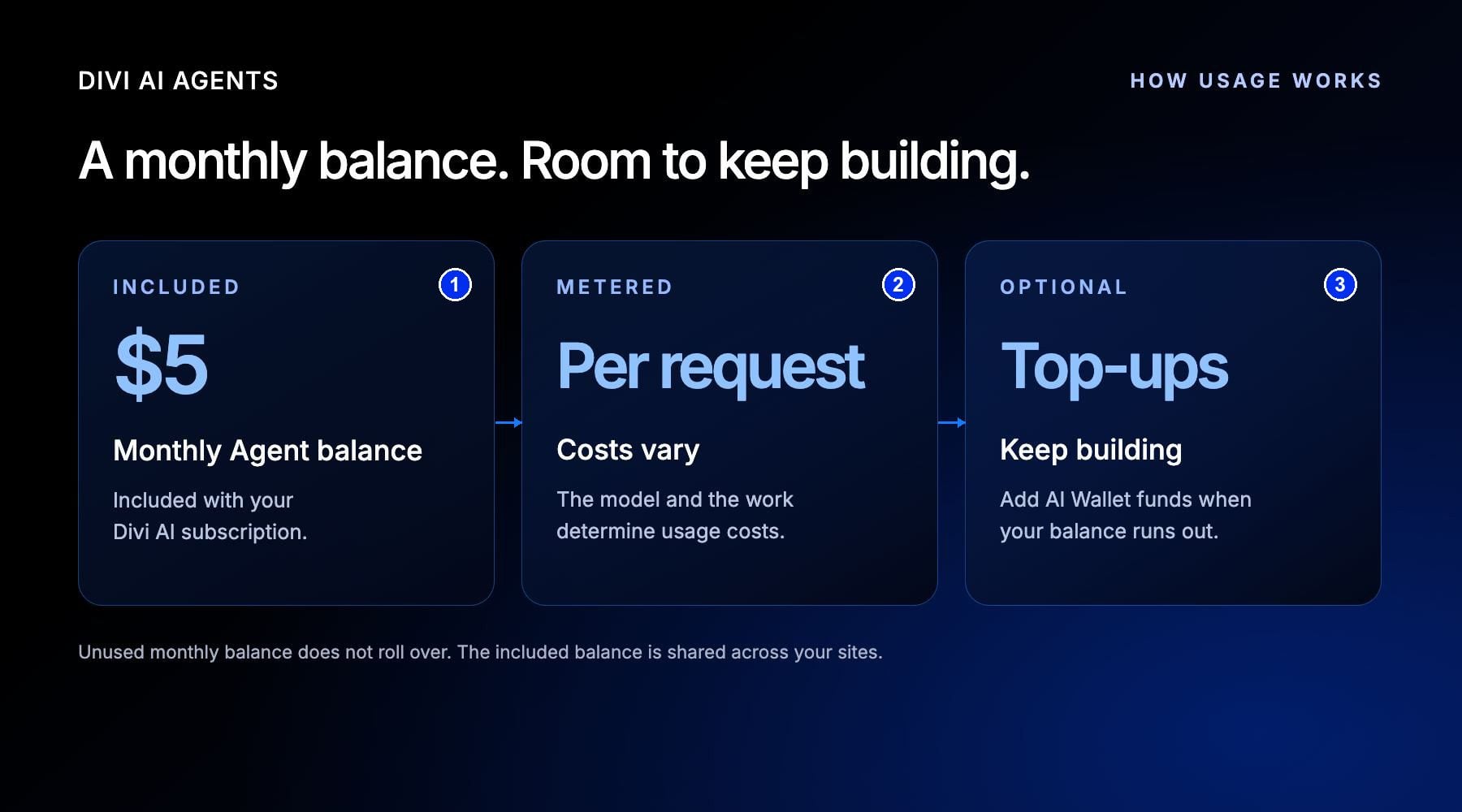
Your included balance refreshes each month and works across all your sites. Unused monthly credit doesn’t roll over. Purchased Wallet funds come into use after the included balance runs out. See the Agent billing and AI Wallet details to plan your usage.
Your existing Divi AI subscription already gives you Agent access; you don’t need another subscription to use it.
Get Divi AI At 70% Off
If you’ll also use the other services in Divi Pro, the Black Friday Divi and Pro bundles offer another way to get Divi AI, with savings up to 80%. Compare the applicable bundle with the individual AI offer based on what your projects need.
Save Up To 80% With Divi Pro
Black Friday pricing won’t last. Get 70% off Divi AI, or explore Divi and Pro bundles with savings up to 80%, before the sale ends.
Bring a reference for your next website and start with a layout you can refine. Carry that workflow into the client projects and websites you build in the year ahead.
Get Divi AI At 70% Off