Blog
How I stopped dreading AI and started studying it full-time

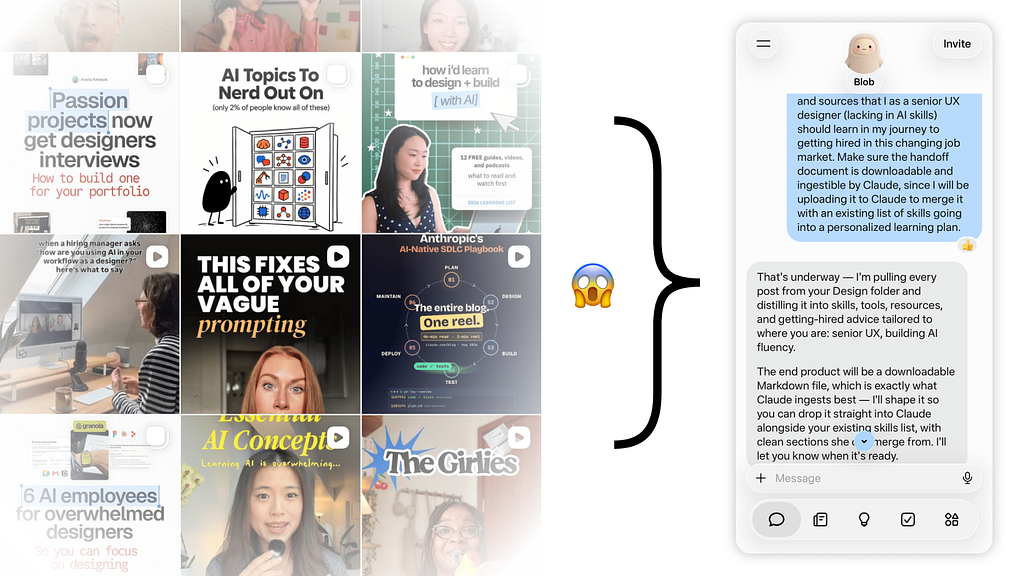
By June 2026, I couldn’t open an app without being told I was falling behind. My Instagram saves were full of designers building agents over a weekend. LinkedIn was a steady stream of people who had “shipped it with Cursor.” And the job listings I was tailoring my resume to kept asking for things like evals, MCP, AI prototyping and Claude Code: words I half recognized and could not have explained in an interview.
I could feel myself staring down a fork. Down one path was a designer I’d been before at times: only integrating new ways of working if my boss told me to do it, dreading every new tool launch, complaining about having to adapt and quietly missing the good old days. Down the other was someone who got excited about what was coming and went looking for it before anyone asked them to.
I realized that I wanted to be the second designer. And I didn’t want to just pick up enough vocabulary to survive a screening call.
I want to dive deep enough to really understand how all of this works, because I won’t be able to truly design confidently for a technology I don’t understand.
For this very big goal, I had to get serious about learning. I asked Muse (Meta’s AI agent, which had access to every post I’d saved on Instagram) to dig through my saved AI and design content and turn it into a handoff doc. I went back through the job listings I had tailored my applications to with Claude and pulled out every AI skill I was missing. Then I handed all of it to Claude and asked for a learning plan that would turn me into the designer I wanted to become.
I had one condition: everything had to be grounded in real sources. Influencer reels are great for finding out what exists, but I wasn’t going to learn an entirely new discipline from a couple of 30-second clips optimized for views. Therefore, I asked Claude to back every topic with at least one article from a trusted source.
What came back was intense: 8 weeks, 40 hours a week, two demo projects to build from scratch and a deadline of November 22. I would be my own manager and my own teacher, working alongside a growing cast of Claudes (one wrote the plan, one tutored me, one built code with me, one helped me journal), and of course I would ultimately be the experiment subject absorbing all of it.

I’ll be honest about why I’m doing this. I want to get hired, but more than that I want to be the best designer I can be, in a field that changes every time I refresh my feed. That takes discipline, and it takes a willingness to look somewhat stupid while I figure things out.
Three weeks in, I’ve been posting one story a week on LinkedIn. This article is a bit different: it pulls those weeks together by theme instead of by date, because the same lessons kept showing up again and again, in a different costume each week.
A plan for a user of one (me)
Unfortunately, the plan written for me has to actually be learned and absorbed by me. It turns out I had to work out how I learn before I could plan anything further.
Week 1 was mostly new vocabulary (agents, tool calls, context windows, evals), so the tutoring Claude built a mini lesson around every reading. It rewrote dense passages in plainer language (I will never be a real engineer), introduced one term at a time and quizzed me with “what would you do?” questions. I loved it, and I also overdid it. I didn’t know which parts mattered, so I took in everything in every format I could: reading it myself, reading Claude’s summaries, reading the plain-language rewrites, then listening to text-to-speech on my outdoor runs. Naturally, Week 1 ran 3 days over.
The plan doc itself needed a redesign, too. It started as one long page, and scrolling through the doc on a trackpad made my carpal tunnel act up. So I treated it like any product with a frustrated user: I complained in a productive way (a.k.a. gathering user pain points) and requested that Claude reformat the doc as one tab per week and a table per task, with a checkbox, the task and its sources, and a notes column.

In Week 2, I changed how I asked. Before touching the readings (Google’s People + AI Guidebook and Microsoft’s Guidelines for Human-AI Interaction), I asked Claude for a short list of what to focus on and a top-down summary of the week’s objectives, plus why each one mattered for me. Then I read both guides on my own, with no tutor wrapped around them, and took my own notes. My delay went from 3 days to 1, and I actually remember that material better than Week 1. Neither mode was wrong. Week 1 needed a tutor because everything was new, and Week 2 needed independence because I finally had something to build on.
What I learned is that the tool only fits me as well as I describe myself to it, so every prompt is really a small design brief. Of course it gets better each time it learns something new about the user (me).
Asking better questions also made me pay closer attention to the answers. And some of those answers were very wrong…
Checking the checker
If I had to sum up all 3 weeks in one phrase, it would be this: nothing and nobody is infallible, and everyone needs a checker (or rather “who watches the watchmen?”) Each week added another layer to check.

Layer 1: checking the work
In Week 1, I built a tiny AI agent that helps people find software their company has approved, and I tested it with evals: the same set of questions asked on every run, graded two ways. Plain code checked exact facts, like which tools the agent used, and a separate reviewer Claude read each answer for meaning. Then I changed one small example in the agent’s instructions, and something I never touched broke. Every code check still passed, but the reviewer Claude noticed that in 4 of the 6 answers about one product, the agent had stopped naming the seller. My tutoring Claude traced the cause to an older example in the instructions, one it had written itself, that left the seller out. The agent was copying that example, mistake and all (read about it on LinkedIn).
What I took away from this is success is entirely determined by the answer key.
I changed the key to where the seller’s name is now a permanent code check, and the reviewer Claude can read the agent’s answers but can’t edit anything. Only I can change the tests, because an AI that can edit both the work and the tests grading it can “pass” just by making the tests easier. (Researchers call this reward hacking, and it’s behind some of the AI “cheating” headlines I’d been reading.)

Layer 2: checking the checker checking me
In Week 2, I flipped it around. I gave Claude scrubbed files from a 2025 usability study I ran at AWS and asked it to synthesize them blind, so I could grade it against my own answer key. Claude credited quotes to the wrong participant twice and turned a neutral remark into an opinion. It also found two errors in my answer key, and one of my 2025 counts changed from 17 of 25 sessions to 18 of 26 (read more on LinkedIn).
Run 2 was real research: synthesizing 13 public forum posts about AWS Private Marketplace. This time I put my research question at the top and gave each source its own labeled section, because Run 1 had shown me what happens without them. All 24 quotes came back exact and credited to the right source. Claude still made mistakes, just a different kind: it stated guesses as facts, and it applied findings about AWS Marketplace in general to the much narrower Private Marketplace. (One of my own leads made the same leap too) Clean, labeled data fixed the quoting errors but left the reasoning errors, so I still check every run.
Layer 3: checking the plan writer
In Week 3, something I had taken for granted made a big mistake. I’m generally a fan of how Claude can turn a pile of information into a structure and plan I can digest. What I assumed was that when I hand it information, it actually reads all of it. Isn’t processing huge amounts of data supposed to be AI’s strength? My first demo project is a redesign of AWS’s developer documentation, and the plan-writing Claude had initially listed 8 problems with those docs for me to solve. When I went back to them, I noticed none had a source and all read like common heuristics. After a week of digging through forums for actual user feedback, I suspected that the planning Claude hadn’t done its due diligence.
So I redid the research in a separate chat with real complaints and a test of the live docs, causing a tidal wave of rescoping for the project. The research Claude kept a log of its own mistakes, including quotes it had pulled from a GitHub page that no longer exists. It also flagged sources that needed context: the harshest Hacker News quote came from the person launching the AI tool being discussed, and a 2019 post asking “Why is AWS documentation so poor?” was promoting a YouTube channel.
Even the plan I built this whole experiment on needed checking. That rescoping cost my previous days.
Layer 4: checking with counts
The last layer came from AWS’s own AI answer agent in its docs. When I tested whether it kept track of follow-up questions, one failed and one passed. Claude suggested wording it as “sometimes loses context.” But “sometimes” can’t be measured, so I asked for harder tests, and the result became 3 of 10 follow-up tests failing (as of Oct 15).
Then on Oct 21 I tested the AWS docs answer agent on follow-ups by asking it about “the third one” from a list of four encryption options it had just given me. Bafflingly, the agent pulled up the second option instead. I tested it twice more and got the fourth option both times: 0 of 3 right, with the same list on screen every time.
Claude suggested fixing this by adding a line of interface text, and I pointed out that no line of text can fix a wrong pick. So the fix moved into code: find item three in the visible list and hand it to the AI, the loading text names the item, and if code can’t tell which one I mean, the response will ask. Claude correctly noted out that this is the same rule as my Week 1 agent.
One test is an anecdote and a count is evidence, and the rules that really matter belong in code, where the AI can’t talk its way around them.
What AI can’t see
Not every miss has a clean explanation. Plenty came from Claude just messing up because it’s an imperfect computer program. But some of them I could trace back to a reason:
Claude can’t see what I see, because what I see comes from years of experience it doesn’t have.
The clearest example sat in Claude’s own screenshots. While planning my docs redesign, the planning Claude captured reference pages from AWS’s documentation and proposed a brand new “ask the docs” AI feature. Weeks later, I was annotating those same screenshots by hand when I spotted a “Search in this guide” box in the page header. I recognized the sparkle icon and gradient border right away, because years of designing with Cloudscape (AWS’s design system) taught me that it uses them only to mark an AI feature. TLDR; AWS already has an AI answer feature in its docs, and Claude didn’t see it at all. My demo went from “I invented an AI search feature” to “I tested a live AWS AI feature, found where it fails, and redesigned it”.

This wasn’t the first time. In Week 1, Claude assumed my second demo was a retail agent that handles product refunds (it took the word ‘marketplace’ in the wrong direction). It’s actually a rebuild of my AWS Private Marketplace work, where companies control which software their employees can buy, and refunds aren’t even something those buyers can act on. I pointed to proof via live AWS docs, and Claude learned its lesson to check in with me more often.
The strangest moment came in Week 3. I was designing what an AI answer should look like after a user stops it mid-response, and I asked Claude to show me what Claude itself does in that situation. It drew a proposal and then admitted it couldn’t draw its own interface correctly from memory, because claude.ai changes too often. So I took three rounds of screenshots of Claude working, Claude stopped before writing anything and Claude stopped mid-sentence, and showed the AI its own screen.
I was designing an AI feature by studying the AI I was designing it with, and it still needed me to be its eyes.
What ties these together is simple. Claude sees what’s written down and what it’s shown (via unlabeled screenshots usually). A lot of what makes me useful as a designer lives in my head: the visual language of a company I worked at, what actually shipped, which details matter to the people who use a product. Once I knew what Claude couldn’t see, I had a better idea of what parts only I could do.
Knowing when (and when not) to use AI
The split I’ve landed on started out of frustration, before this plan existed. Back in August, I was doing a four-hour take-home assignment for a contract role interview and had just connected Figma to Claude for the first time. I asked Claude to take its own reference screenshots, and it couldn’t (the browser extension wasn’t connected, and its sandbox couldn’t reach the websites). So I did it all by hand. I took the screenshots, marked what worked and what didn’t with sticky notes in Figma, and handed those annotated boards to Claude as my wireframes to build four different website directions.
Two months later, Claude can take the screenshots itself but I still do the annotating. In Week 3 I pulled every screenshot into Figma and covered them in sticky notes. Each of the 9 docs problems got its own color, so I can see them zoomed out in a sprawling file, and each note gets a matching box around the exact element it’s about.

AI can now build, migrate and spin things up from nothing, and I’m happy to let it. But critique and pixel-level inspection are the core of my job as a senior designer.
The sparkle icon and gradient border only jumped out at me because I was the one looking closely, and because I knew what Cloudscape uses them for. AI can gather my annotations and group or transform them, but it can’t make them for me.
The opposite case came a few days later. By then, “Ask Docs” meant three different things across my docs: AWS’s live AI feature, my redesign of it and the first round of tests I ran. I knew this was exactly the kind of job AI does well (finding every instance of something, sorting each one by what it means and replacing all the names), so I handed it over with suggested names of my own. Claude made 28 changes in the research doc alone, and it caught two things I’d missed along the way.
It also suggested naming my redesign Grounded Answers. I hadn’t known “grounding” was an AI term (it means an answer comes from its sources), but it’s a word the AI practitioners interviewing me will know, so I took it. OK, Claude!
And sometimes the right tool isn’t AI at all. My redesign assumed most developers search the docs first, the way I do. Instead of asking Claude whether that was true, I texted a former coworker who’s a senior engineer. He sent back: he does a search first to find the area or topic, then lingers in the navigation to see related pages. He also told me AI reads most docs for him now, and he no longer checks its sources. I kept accurate source links in my design anyway, because the developers who do check need them, and losing their trust can be crushing for an AI product. One person isn’t research, so search-first stays a hypothesis. But one real person told me more than any confident paragraph from a model could.
Knowing what to hand off, what to keep and when to ask a human is the skill I’m practicing most. Once I understood that split, I could design better alongside Claude instead of around it.
AI as a design partner
Week 3 was my first real design work of the plan, and designing with Claude felt like working with an awkward but productive teammate: brilliant at some things, weirdly awful at others, and always ready to get stuff done.
The best test came over where my redesigned AI answers should live on the page. Claude recommended a resizable drawer on the right side of each docs page and cited Cloudscape (AWS’s design system, which I know like the back of my hand) to back it up. I pushed back over several rounds: I reasoned that the docs page already has two side panels, and a third would squeeze the content even more. When Claude then offered to move search into the existing (page-level) right panel instead, I said no for good. Search covers every guide and every service, so it belongs on the top header level, while side panels sit below the header and only show content for one page. Claude agreed, and then found its own test results backed me up: AWS’s AI feature already reads beyond the current guide. Claude knew the pattern rules. It took my information architecture sense to see which level the feature belongs on.
My reaction at the time: “wow my old Cloudscape reviewer eyes have not failed me yet, even a year out of practice.”
Other times it worked the way I’d want a good partner to. When I changed my mind about how to show that an AI answer might be wrong, I asked Claude the questions I couldn’t answer myself: should confidence be judged for the whole answer or for each section, and how much “why” should a user see? It came back with Amazon Bedrock’s grounding checks and HCI research, including a 2024 study from Microsoft Research with 404 participants. When an AI answer hedged in the first person (“I’m not sure, but…”), people agreed less often with its wrong answers and got more answers right overall (Kim et al., FAccT 2024). It also checked my mockup against the live Cloudscape rules and caught two real fixes.
And I had to learn to specifically ask for pictures. When I talk an idea through with a human designer/PM/engineer, someone can grab a pen and sketch it out. Claude can only draw through code, so its ideas arrive as walls of words. Now I ask it to “demonstrate visually” before I approve anything I can’t picture, and I only approve a change once I’ve seen it with my designer eyeballs.

By the end of the week, I’d written Claude a performance review. The short version: as a manager setting scope and requirements, Claude was supremely confident and frequently wrong. As a teammate doing the groundwork, it was far more trustworthy (as long as I set the scope). Asking simple questions out loud, like whether my research covered one AWS service or all of them, kept the scope from slipping more than once.
The part I keep thinking about is how easily Claude agrees with me. When I make an executive decision it almost always goes along with it, which spares me from upsetting several levels of stakeholders over a hunch. It also means I could bully it into agreeing with almost anything.
I’m an honest person trying to actually retain everything I’m learning so I’m not going to sweep away inconvenient feedback. This is the same discipline that got me started grinding on this plan in the first place.
Me and AI
Some learnings are already leaking out of the plan and into my everyday tasks. In Week 1 I learned how the context window works: when a chat runs too long, Claude gets worse at the task and burns through more tokens. So I wrote it into my account-level instructions, and now Claude tells me when it’s time to start a fresh chat. I’ve used that rule to hand off this very journal more than once.
Other lessons are about what I won’t hand over. This week, I asked Claude to make the graphic for my Week 3 post (see the report card above). It built a clean, tidy performance review form, and I liked the report card idea, but the result looked way too AI-made. I wanted something scrappy and imperfect, so I took the idea and remade it myself in Figma.
The same goes for writing. I’ve asked Claude to help draft my posts, but none of them ever sound quite right.
I realized that AI can only work from sampling the work of past me, but I as a person am always evolving. I am always adding something new to how I write and talk, from whatever I’m reading, learning or living through that week. No context window can hold all of me.
When Claude writes, it treats me as a formula and fills in any gaps with patterns from other people’s writing. Of course my voice gets diluted. This article started as a Claude draft too, and every sentence you just read went through copious rewrites from my carpal-tunnel-plagued hands before it settled here.

This brings me back to where I started. I took on this plan to become a designer who understands AI well enough to know what to give it, what to check and what to keep. Three weeks in, the most valuable thing I’ve built is a shift in habits: be curious about new things, and trust none of it until I’ve checked it for myself.
In Week 4, I’m building my redesign in real code with Cloudscape components and setting up evals to test it against AWS’s live feature. I’ll keep posting one story a week on LinkedIn, and the next theme article comes after Week 6.
If you’re a designer learning AI right now: what’s the part of your work you’ve vowed never to hand over to a fancy computer program?
Further reading
The basics
- Building effective AI agents, Anthropic (2024). The Week 1 reading that taught me what an agent actually is.
- Context windows, Claude docs. Why long chats get worse, and why Claude now tells me when to start a new one.
- What is the Model Context Protocol (MCP)?, modelcontextprotocol.io. One of those job-listing words, explained by the people who made it.
‘’A plan for a user of one’
- People + AI Guidebook, Google PAIR.
- Guidelines for Human-AI Interaction, Microsoft Research (CHI 2019). The 18 guidelines behind the HAX Toolkit, and my other Week 2 reading.
‘Checking the checker’
- Demystifying evals for AI agents, Anthropic (2026). How to test an agent with the same questions every run.
- Reward Hacking in Reinforcement Learning, Lilian Weng (2024). A deep dive into why an AI that can edit its own tests shouldn’t be trusted to.
‘What AI can’t see’
- Ingress, Cloudscape Design System. The rule behind the sparkle icon I spotted: “Sparkles are the symbolic convention for generative AI.”
- Colors: Gradients, Cloudscape Design System. The rule behind the gradient border, which is reserved for “elements that represent a generative AI entity.”
- Generative AI patterns, Cloudscape Design System. The full set of chat, loading, follow-up and regeneration patterns I designed with.
‘AI as a design partner’
- Use contextual grounding check to filter hallucinations in responses, Amazon Bedrock docs. How AWS checks whether an answer actually comes from its sources.
- “I’m Not Sure, But…”: Examining the Impact of Large Language Models’ Uncertainty Expression on User Reliance and Trust, Kim, Liao, Vorvoreanu, Ballard and Wortman Vaughan, FAccT 2024. The 404-person study on AI that hedges in the first person.
My weekly LinkedIn posts
- Week 1: the regression my evals caught
- Week 2: the blind test that graded me too
- Week 3: Claude’s performance review
- My Week 1 agent’s code, GitHub
I’m Lisa Liu, a senior product designer based in NYC, most recently at AWS Marketplace and AWS Data Exchange. This is the first theme article in my Teaching Myself AI With AI series. Currently available for senior IC and design lead roles. Portfolio at lisanianliu.framer.ai.
Find me on LinkedIn or at lliu29@yahoo.com.

How I stopped dreading AI and started studying it full-time was originally published in UX Collective on Medium, where people are continuing the conversation by highlighting and responding to this story.