Blog
Which One Fits Your Next Site?

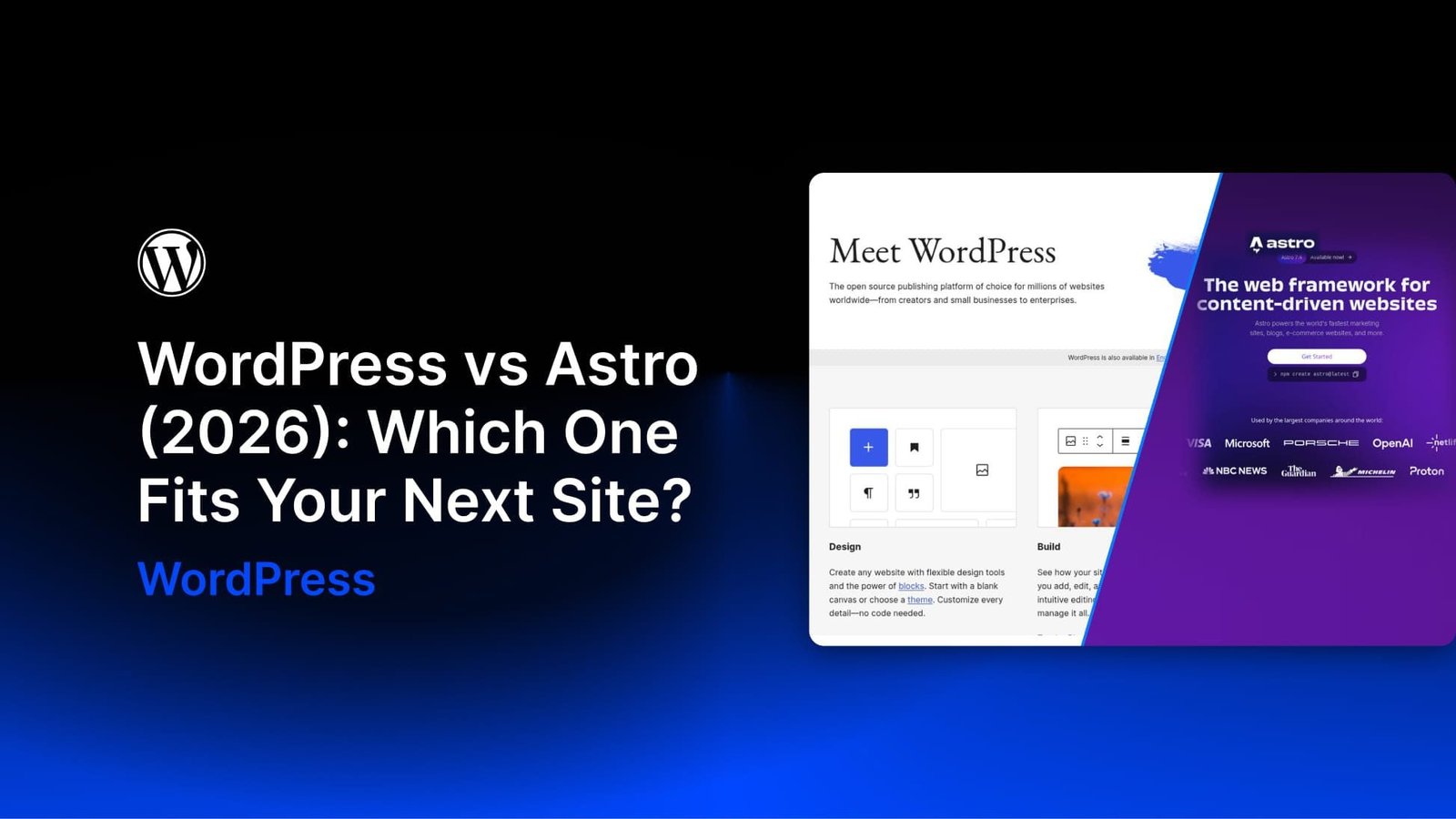
WordPress and Astro can both power a blog, portfolio, or business website, but they give you different starting points. WordPress includes a content management system with an editing dashboard, user accounts, and a media library. Astro is a web framework that lets developers build the front end and choose how content is managed.
For many projects, the deciding question is who will edit the site after launch. A developer maintaining a site through code has different needs from a client who wants to update services, publish articles, and manage inquiries independently.
My experience is mainly with WordPress sites built around options pages, custom post types, and custom fields. I approached Astro from that perspective: where does it simplify the work, and where does it require a different setup? This comparison uses a small demo to explore those differences rather than treating either platform as the best choice for every site.
What Astro Is, And What It Leaves Out
Astro is an open-source framework designed for content-driven websites. By default, it generates HTML pages during a build. It can also render routes on request using an adapter for a supported runtime or hosting platform, including Node.js, Netlify, Vercel, and Cloudflare.
Its islands architecture lets developers add interactive components where needed without requiring the entire page to run as a client-side JavaScript application. Content collections, server islands, Actions, and sessions support more complex sites, but they do not turn Astro into a ready-made CMS.
The company behind Astro joined Cloudflare in January 2026. The announcement states that Astro remains open source under the MIT license and available for deployment beyond Cloudflare.
The one-page demo used for this comparison produced an HTML file of 2,734 bytes in the build output folder. That is the size of one generated file, not a measurement of the complete page with its images, styles, and other assets.
Astro generates deployable files from the project’s source code and content.
Astro itself does not include an editorial dashboard, media library, or ready-made user management system. Content can live in Markdown, MDX, and data files, or come from an external CMS.
Without a CMS integration, maintaining that content means working with project files and a development environment. Adding a CMS can give nontechnical editors a browser-based interface, but choosing and configuring that interface becomes part of the project.
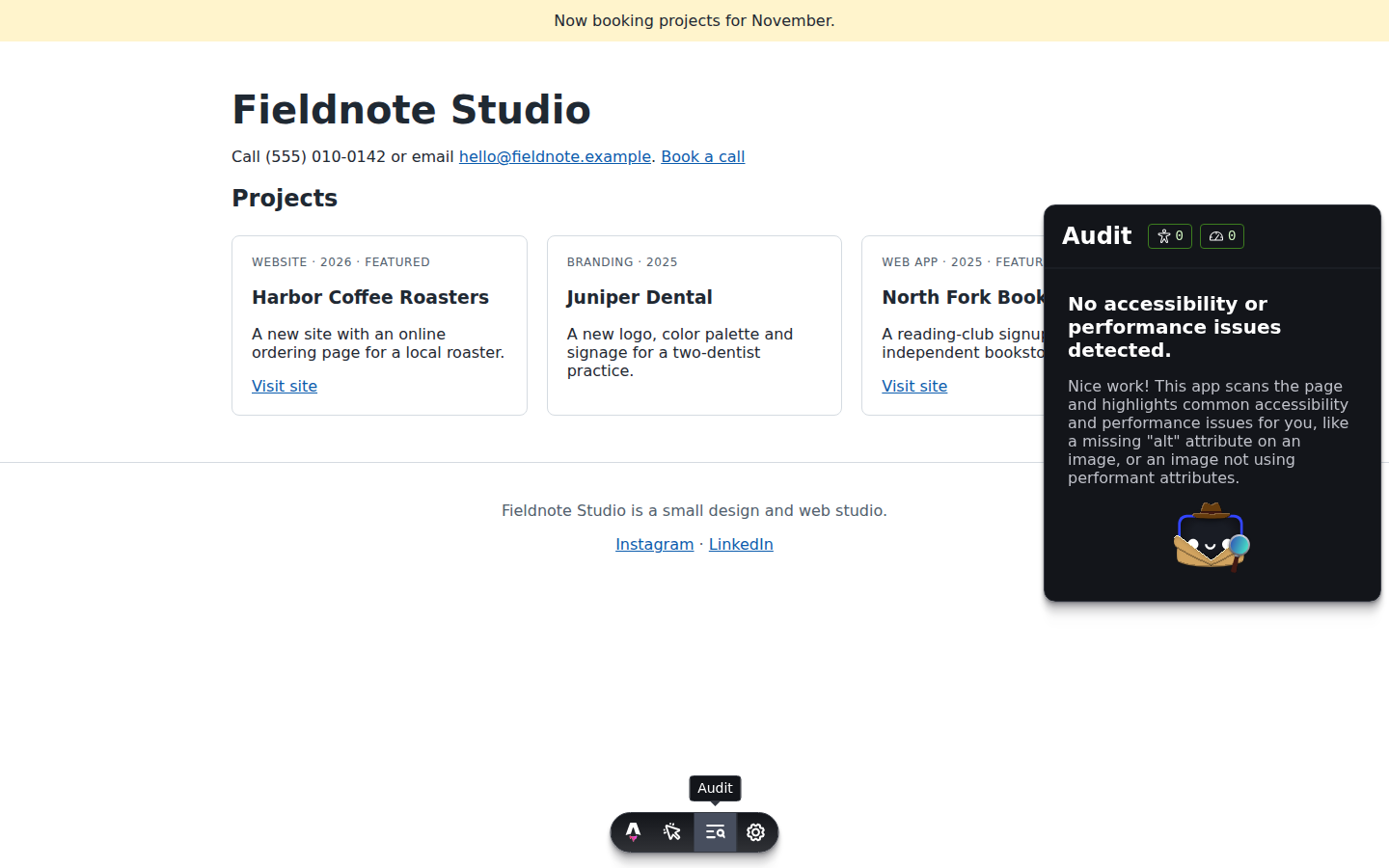
During development, Astro also provides a toolbar. Its Audit app checks the current page for supported accessibility and performance issues, giving developers feedback while they work.
What WordPress Brings To Similar Builds
WordPress starts with the content management tools already in place. Editors can create posts, upload media, manage revisions, and publish through the dashboard.
Developers can register custom post types and metadata using WordPress’s core APIs. A custom fields plugin adds a more convenient interface for defining fields and displaying them on editing screens. Post types and fields can also be exposed through the REST API when configured appropriately.
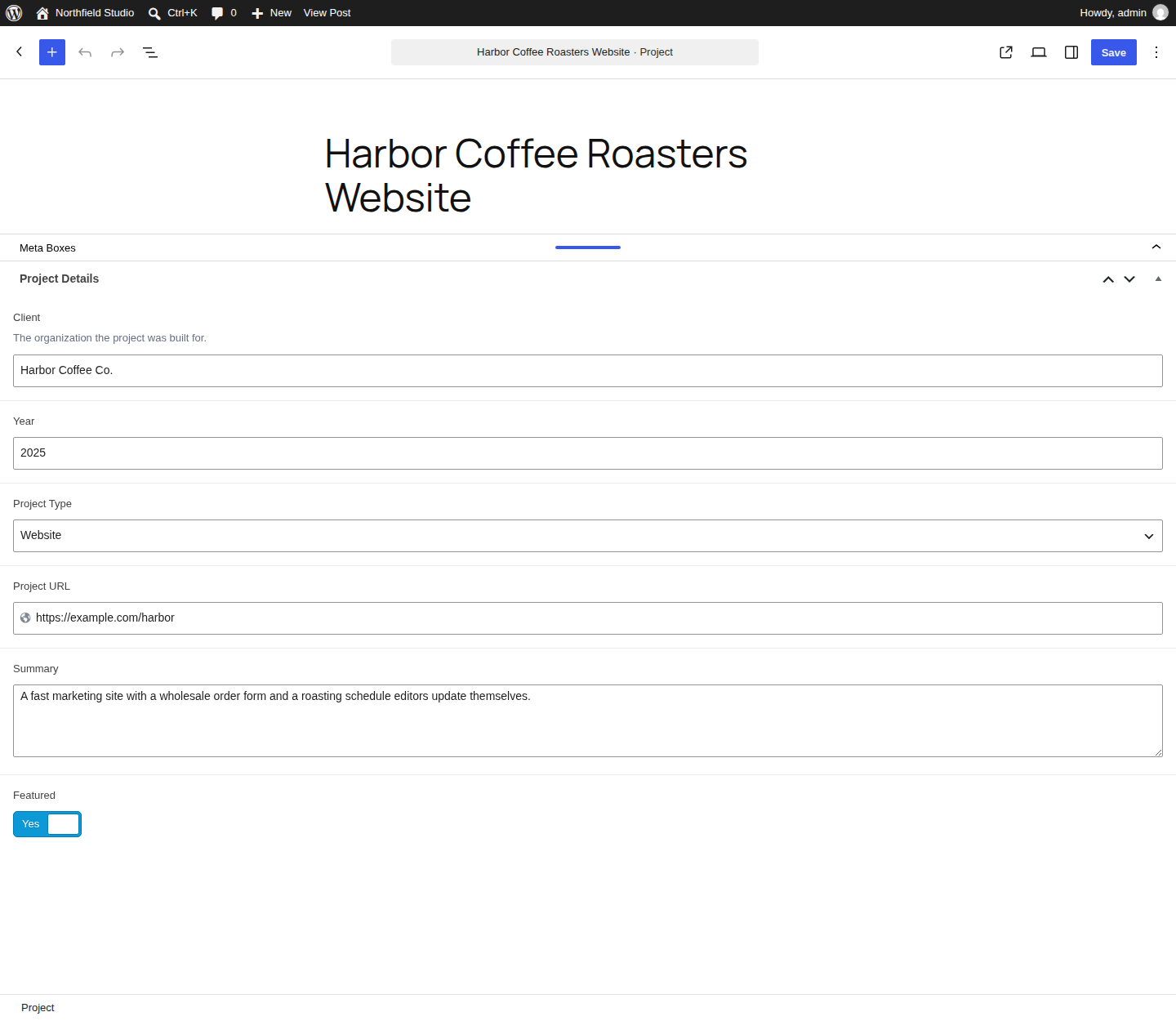
For site-wide settings, developers can build options pages with the WordPress Settings API or use a plugin that provides an interface for creating them.
Advanced Custom Fields PRO includes options pages, with annual plans priced at $49 for one site, $149 for 10 sites, and $249 for unlimited sites at the time of writing. Secure Custom Fields, a free fork of ACF, also includes options pages.
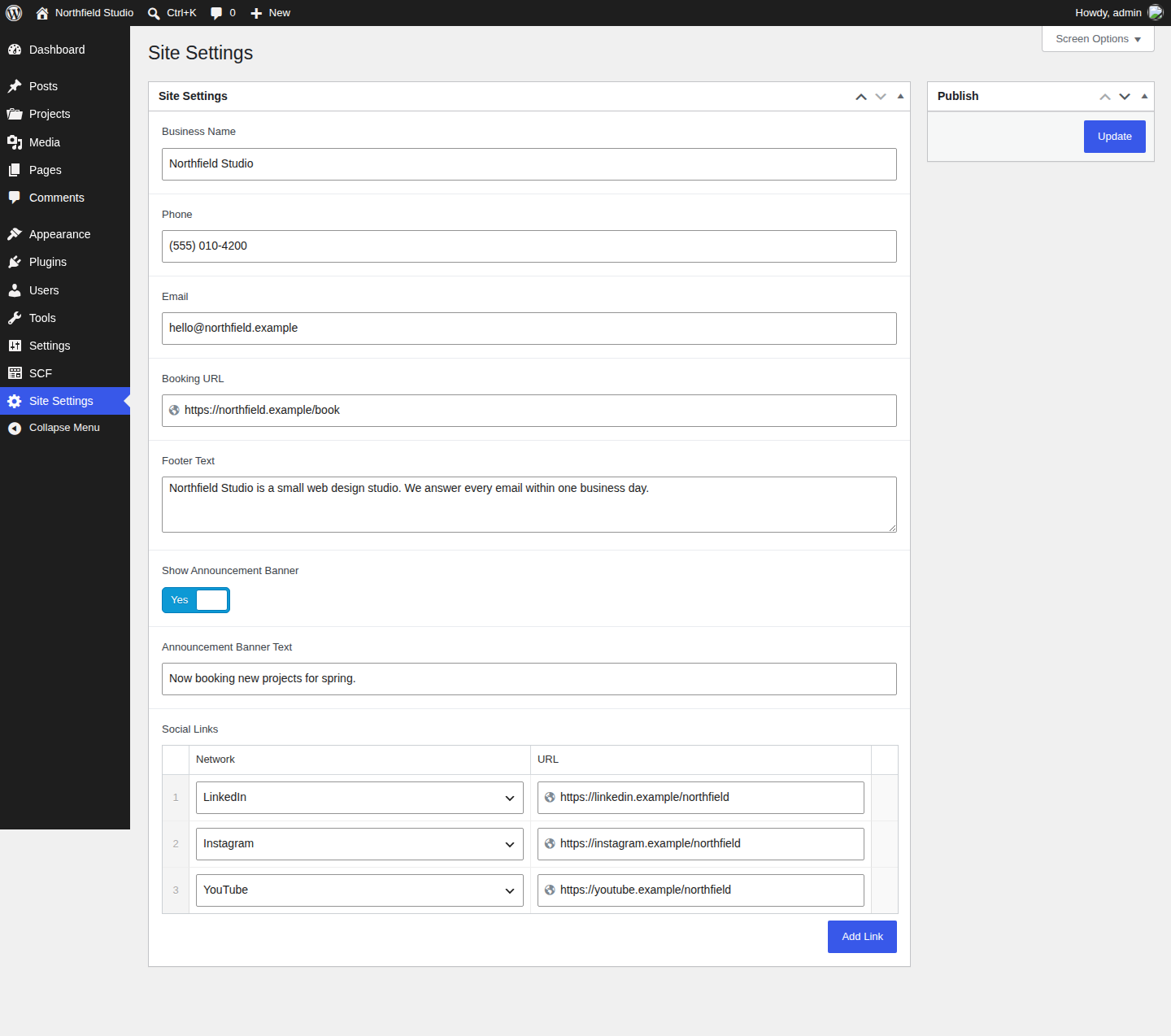
WordPress also has a large ecosystem of plugins and themes. That gives site owners many ways to add features without developing each integration themselves. The tradeoff is choosing compatible tools and maintaining them.
The Question That Decides It: Who Edits The Site After Launch?
The technology behind a site matters, but so does the work its owner needs to do next month. A small client site makes the difference easier to see.
The Same Client Site On Each Platform
My client sites usually have options pages, custom post types, and custom fields. Clients update shared settings on the options pages and add content through a defined set of fields.
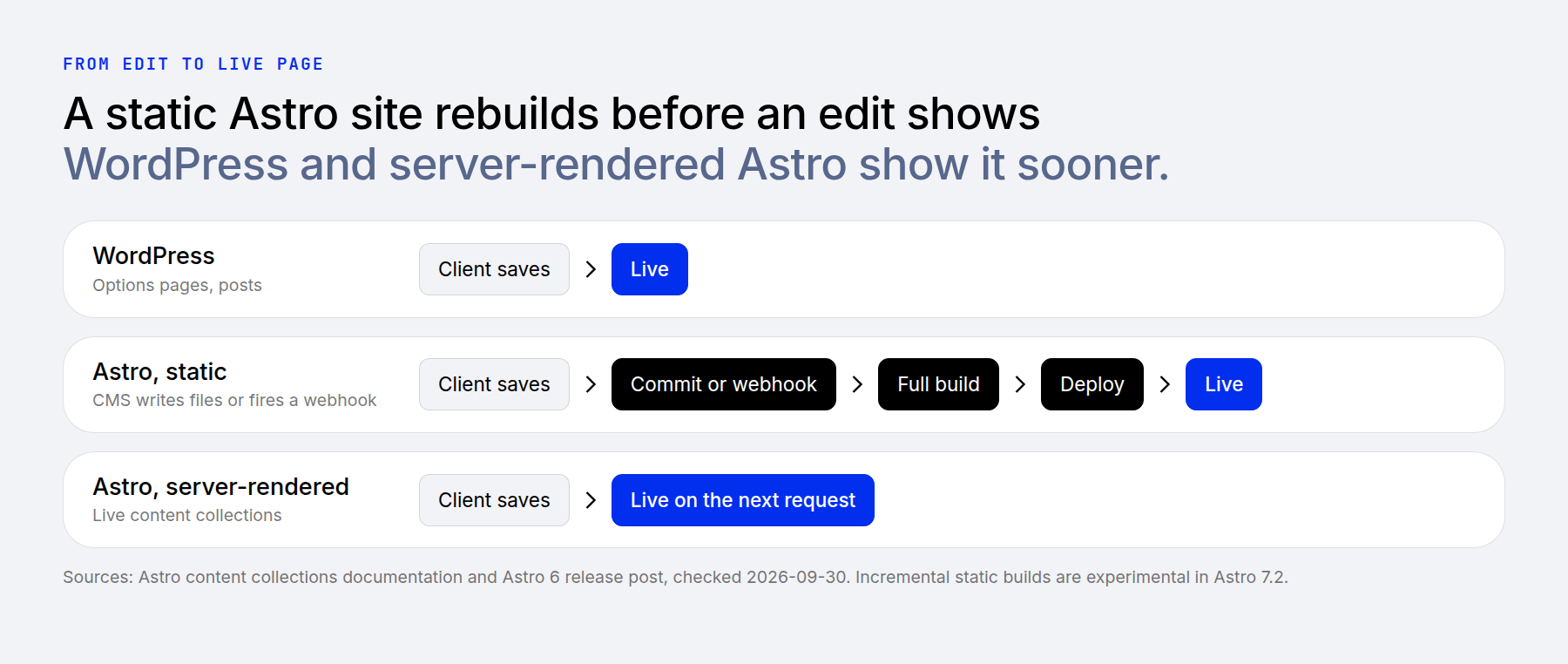
On WordPress, those tasks happen in one dashboard. Publishing a new post or updating a published one makes the change available without a separate front-end build, although caching can delay what visitors see.
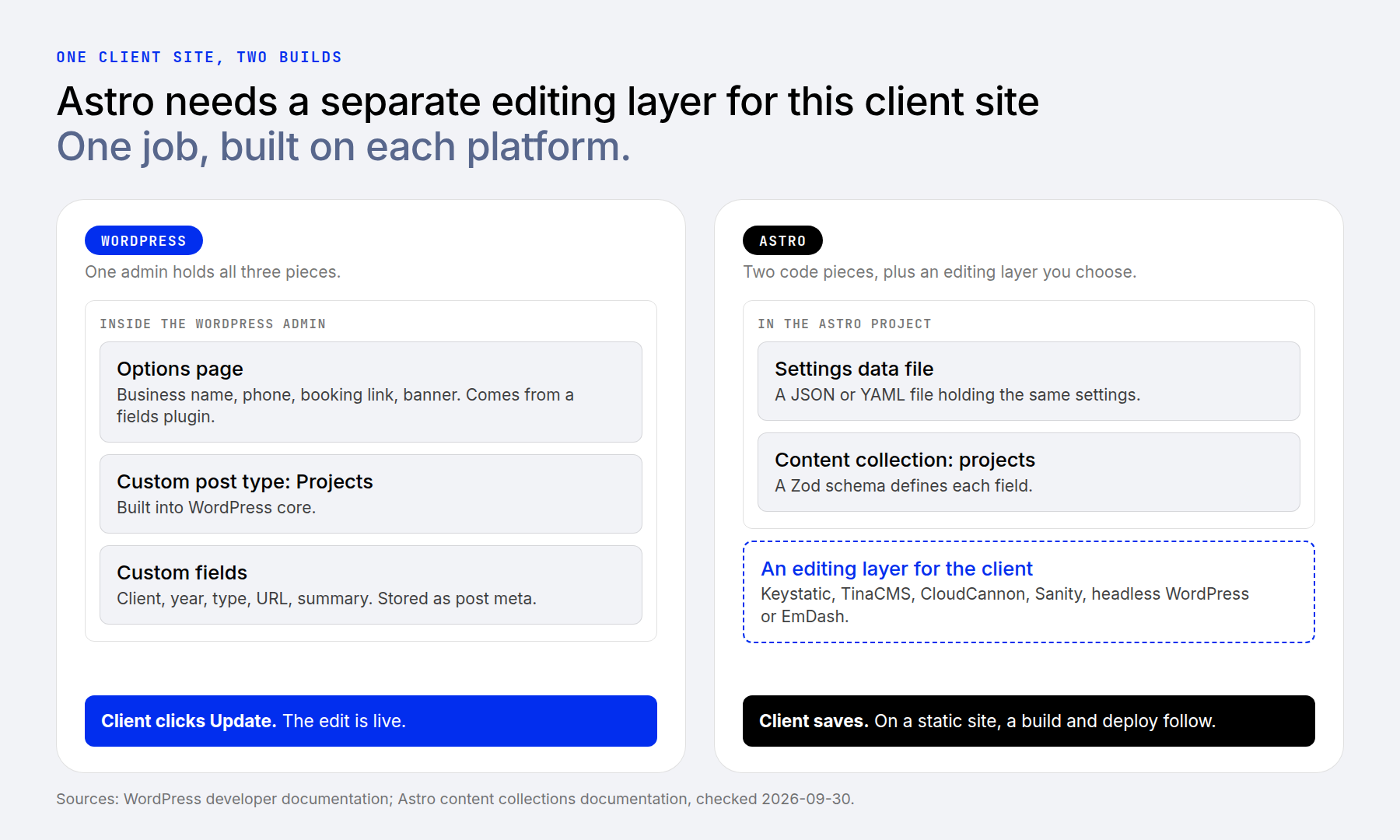
In the Astro demo, the equivalent structure uses a content collection for projects and a settings data file for shared business information. A Zod schema defines the expected fields and validates their values.
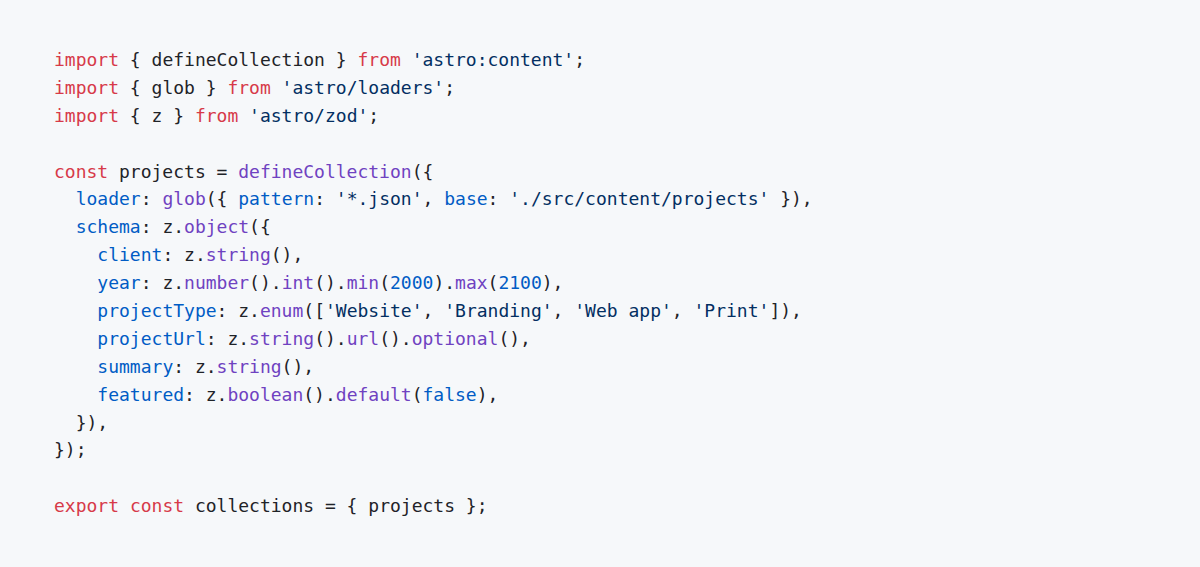
A schema defines the expected content structure and helps catch invalid data.
A schema validates the data supplied to it; it does not create an editing screen. To let a client manage those fields without opening project files, we need to add a CMS.
The page then reads the settings and collection entries and uses them to generate the design.
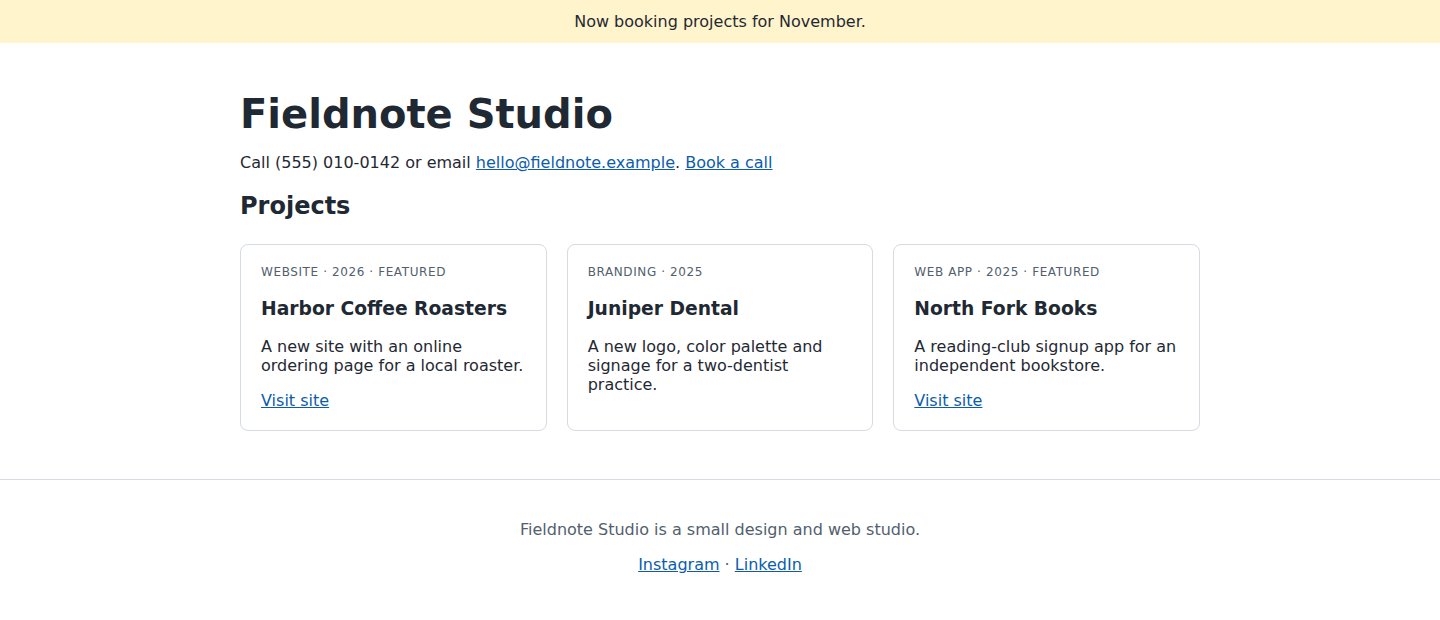
In this demo, the studio information comes from the settings file, while the project cards come from the collection.
Choosing An Editing Layer For Astro
There are several approaches to adding a CMS:
- Git-based editing: Tools such as Keystatic, TinaCMS, and CloudCannon can manage content stored in a repository.
- A hosted content platform: A service such as Sanity stores content separately and makes it available through APIs.
- Headless WordPress: WordPress provides the editing environment, while Astro retrieves the content and builds the public-facing pages.
Keystatic illustrates how a settings screen can work in a file-based setup. A singleton represents one shared content record, similar to the information managed through a WordPress options page.
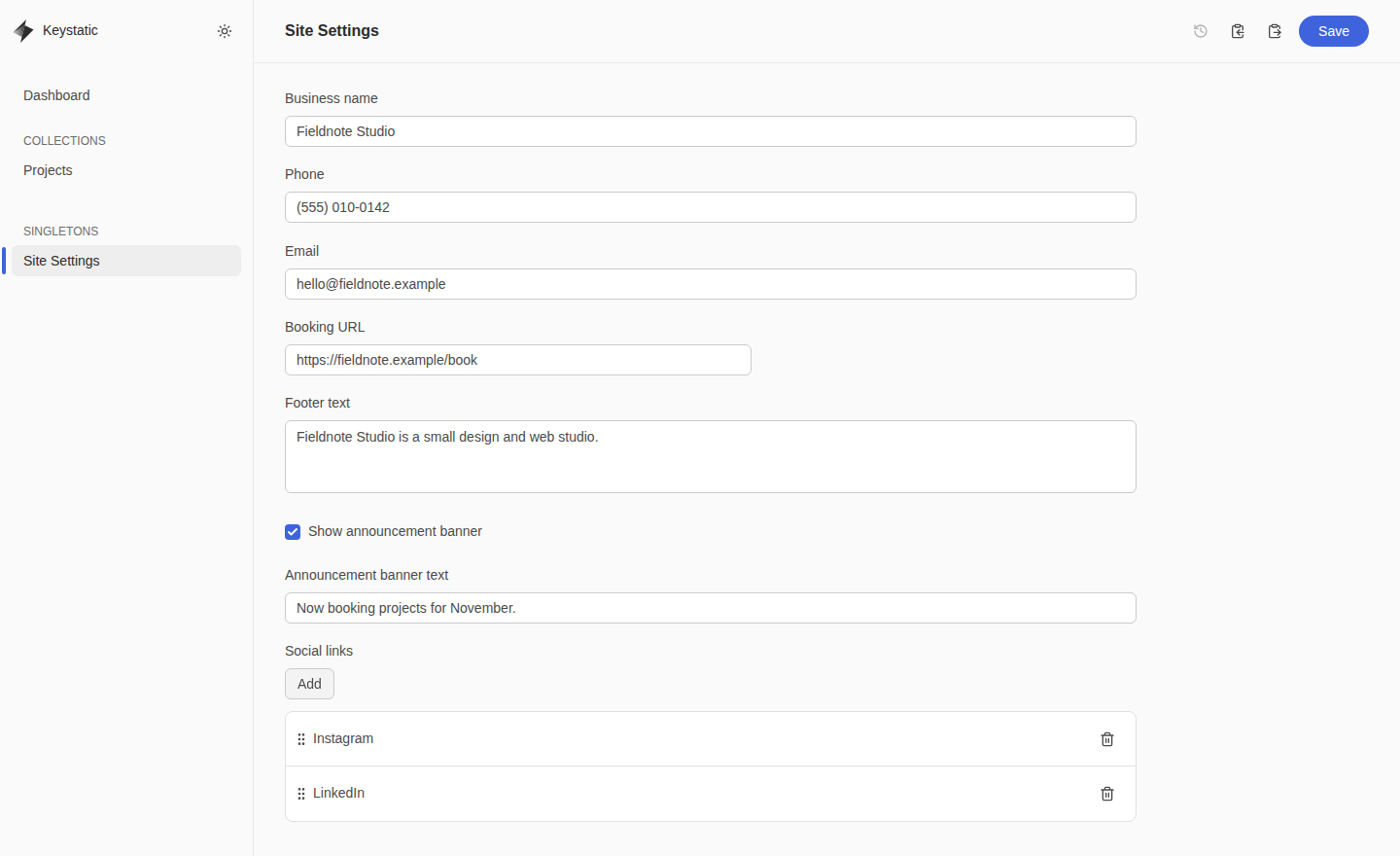
Keystatic’s local mode writes to the local filesystem. For a deployed editing interface, its documentation describes a GitHub-connected setup, with Keystatic Cloud available to simplify authentication. The deployed integration also needs a compatible server runtime.
In the setup shown here, the field definitions exist in both Astro’s validation schema and the CMS configuration. Those definitions need to stay aligned. Shared definitions or additional validation can help, but that coordination is part of the implementation.
How Long An Edit Takes To Go Live
On a conventional WordPress site, publishing or updating content does not require rebuilding the front end. The change becomes available through WordPress, subject to caching and any publishing workflow in use.
On a statically generated Astro site, content changes normally trigger a build and deployment. A Git commit or CMS webhook can start that process automatically, but visitors see the updated pages after deployment finishes.
Build time depends on the content, integrations, and hosting setup. Astro introduced experimental incremental static builds in version 7.2 to reuse eligible pages whose code and content have not changed.
An Astro route that retrieves current CMS content at request time can show updates without rebuilding that route. Its freshness still depends on caching and how the data is fetched.
Clients may not care which stack a developer chooses, but they do care about whether routine changes are easy and reliable. Before choosing either platform, establish what the owner can edit, how previews work, and when published changes will appear.
Routine WordPress Features That Need Rethinking On Astro
WordPress plugins package many common site features into an installable product. On Astro, equivalent features may come from a CMS, hosting service, JavaScript package, or custom integration.
Astro already supports image processing and internationalized routing, with official integrations for features such as sitemaps and RSS. Its documentation theme, Starlight, includes search. The larger implementation differences appear when a site needs forms, commerce, accounts, or visual editing.
Forms: Astro Actions and on-demand API endpoints can process submissions. Developers still need to connect the required storage, email delivery, spam protection, and submission management. A form can also submit directly to an external service, allowing the public pages to remain static.
WordPress form plugins package more of that workflow into a dashboard. A builder such as Divi also provides integrations for styling forms from plugins such as Gravity Forms and Contact Form 7.
E-commerce: Astro can support checkout links, embedded payment services, and custom storefronts connected to commerce APIs. It does not supply a built-in product and order management dashboard. Its e-commerce guide includes examples using services such as Lemon Squeezy, Paddle, and Snipcart, but those examples are not the limits of what developers can integrate.
WordPress with WooCommerce provides product, cart, checkout, and order management within the WordPress environment. Divi’s WooCommerce modules add visual design controls for store pages.
Accounts: WordPress includes users and roles, while plugins extend those foundations into memberships, courses, and customer portals. Astro can integrate authentication tools such as Better Auth or Clerk, but the developer must also implement the site’s access rules and member features. Having sessions or authentication available is not the same as having a complete membership system.
Visual editing: WordPress includes the block editor, and Divi’s Visual Builder provides visual page-building tools. Astro does not include an equivalent editor in the framework itself. Services such as CloudCannon and other CMS integrations can add visual editing, with capabilities that depend on the chosen service and implementation.
For planning purposes, the distinction is:
- Content editing: WordPress includes a dashboard; Astro uses project files or an added CMS.
- Common site features: WordPress offers established plugin workflows; Astro gives developers more responsibility for selecting and connecting the pieces.
- Design changes: WordPress editors and builders expose design controls; Astro’s editable design controls depend on the integration.
- Ongoing costs: Compare hosting, licenses, service subscriptions, development, and maintenance across the complete setup.
Performance: What The Numbers Say And What They Don’t
Astro’s homepage highlights a Core Web Vitals comparison of approximately 71% for Astro and 48% for WordPress. That supports a practical reason to consider Astro: its default rendering approach can make it easier to deliver content with less client-side JavaScript.
The chart below presents the August 2026 comparison used for this article.
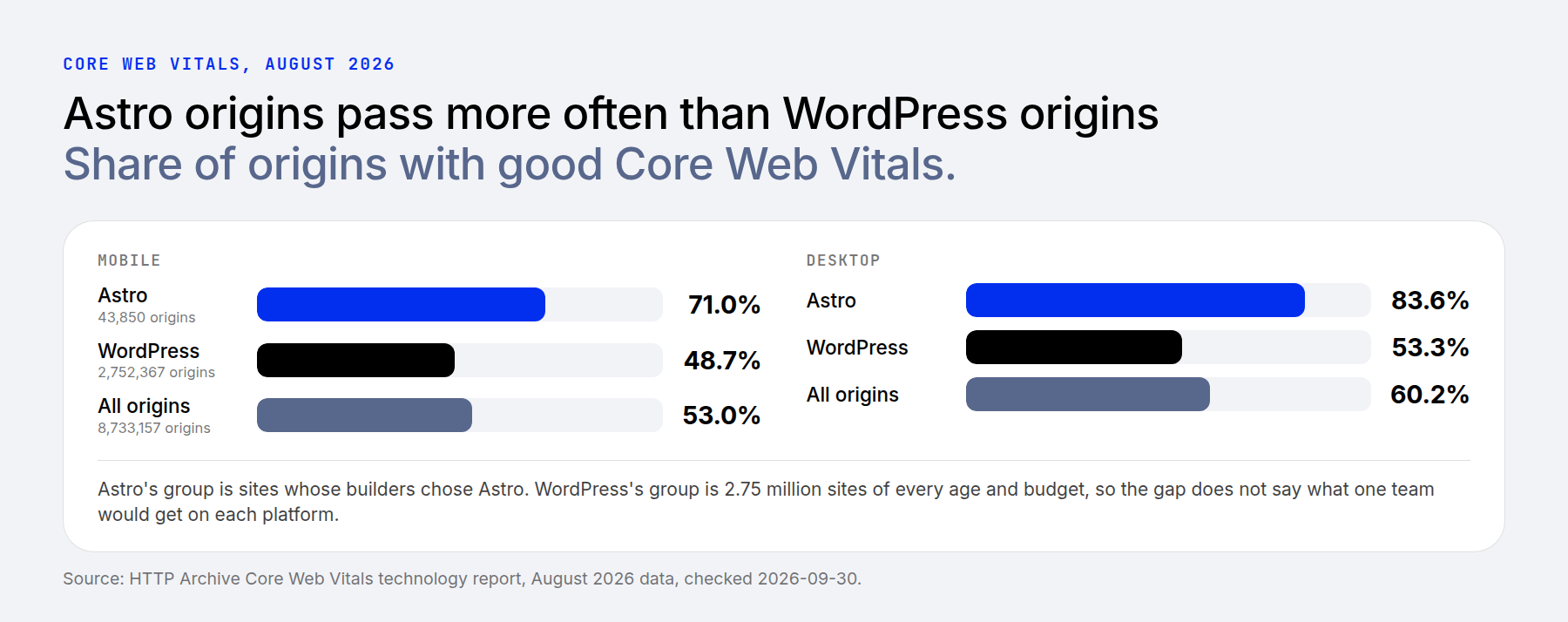
These figures compare populations of websites, rather than the same site built twice by the same team. WordPress serves a much broader mix of sites, including older installations and projects with very different budgets and maintenance practices.
The results are useful context, but they do not predict an individual project’s performance. Astro sites can still load substantial JavaScript through interactive components, analytics, and third-party services. A small framework footprint does not guarantee a small finished page.
On WordPress, theme choice, plugin behavior, hosting, caching, and image handling all affect the result. Test representative pages and important interactions on the finished site instead of relying on the platform name alone.
Security And Upkeep
A fully static Astro deployment serves generated files without running WordPress, PHP plugins, or a database to render each page. That removes some common attack paths from the public-facing site.
It does not remove maintenance. The project still has dependencies, deployment credentials, and any connected CMS or services to secure. Adding server-rendered routes, authentication, or custom endpoints introduces additional responsibilities.
WordPress has a different maintenance profile. In its 2026 security report, Patchstack recorded 11,334 vulnerabilities disclosed across the WordPress ecosystem in 2025, a 42% increase over 2024. It attributed approximately 91% to plugins and reported six low-priority issues in core.
Those are ecosystem-wide disclosures, not vulnerabilities present on every WordPress site. The software installed on a particular site determines its exposure.
For my WordPress work, I use a limited selection of vetted plugins and add vulnerability monitoring where appropriate. That approach still requires timely updates, tested backups, access controls, and a plan for replacing abandoned software. Hosting protections are another layer, not a substitute for maintaining the application.
AI Tooling On Each Side
AI has made me more productive on WordPress, and the platform now includes infrastructure designed to support those workflows.
The Abilities API, introduced in WordPress 6.9, lets developers register capabilities in a machine-readable form. WordPress 7.0 added an AI Client that gives plugins a shared PHP interface for working with AI providers. These are developer foundations; the available user-facing features depend on the tools installed and configured.
The official MCP Adapter can expose registered abilities to compatible clients. Builders add their own tools too. Divi AI Agents works inside the Visual Builder, where plain-language requests can create pages and add, edit, or move modules. Our roundup of WordPress AI plugins covers more options.
Astro’s AI tooling documentation focuses on helping coding agents work with Astro projects. Its documentation MCP server gives compatible tools access to Astro’s documentation.
Both platforms can be used with coding agents. The practical difference is where the workflow happens: an integrated WordPress tool can work within an existing editing environment, while an Astro coding workflow commonly changes project files and sends those changes through a build and deployment process.
The Middle Path: WordPress For Editing, Astro For The Front End
You can also use WordPress as a headless CMS behind an Astro front end. Editors keep the WordPress dashboard, while Astro retrieves content through an API and controls how the public pages are rendered.
This approach combines the two platforms’ strengths, but it also creates two application layers to maintain. You need to plan content fetching, previews, authentication where required, and how published changes reach visitors.
For static pages, that usually means triggering a deployment when content changes. Routes that fetch content on request can avoid that rebuild requirement, subject to their caching strategy.
Astro’s headless WordPress guide provides a starting point for retrieving posts and custom post types. Custom fields and site-wide settings need additional configuration.
For example, ACF post fields can appear in REST responses when the relevant field group’s Show in REST API setting is enabled. Options-page values require separate handling, such as an appropriately secured custom endpoint or a suitable integration. Only expose data intended for the front end.
I have not built this hybrid setup for a client, so I would treat it as a separate architecture decision rather than assume it is an easier version of either platform.
Which One To Pick For Your Next Site
Choose the platform around the site’s editing, publishing, and maintenance requirements.
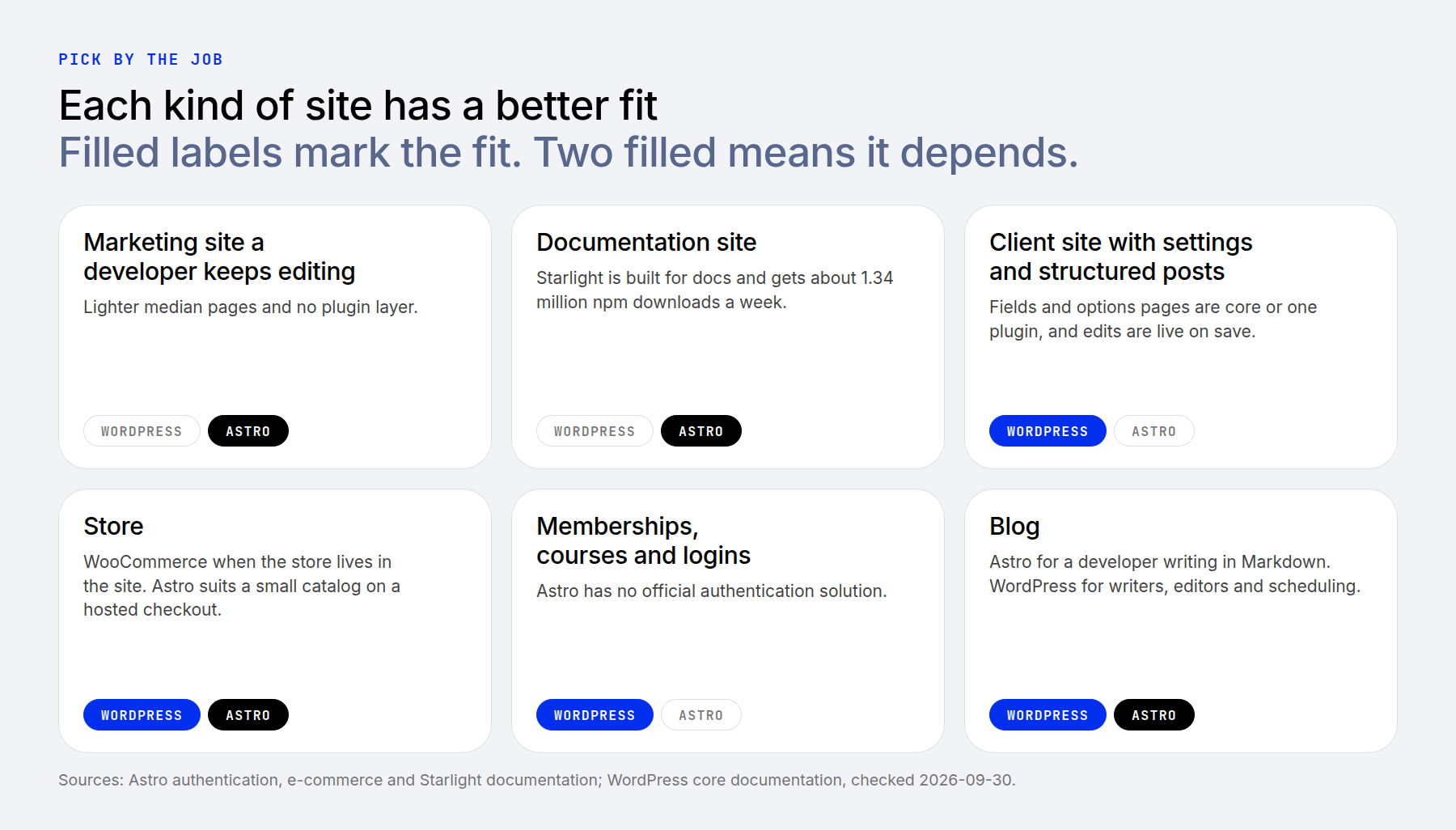
- Developer-maintained marketing sites: Astro is a strong option when a developer owns the content workflow and wants direct control over markup, assets, and integrations.
- Documentation sites: Astro with Starlight provides a focused starting point for structured documentation.
- Client sites with shared settings and structured content: WordPress often provides a more direct handoff because the editing dashboard is already part of the platform.
- Stores: WordPress with WooCommerce suits teams that want store management inside their site. Astro is worth considering when the team wants a custom storefront connected to a separate commerce platform or checkout service.
- Memberships and courses: WordPress offers established plugins that combine access management, payments, and editorial tools. Astro can support these projects, but expect more integration work.
- Blogs: Astro suits developers who enjoy a file-based publishing workflow. WordPress is often the simpler starting point for writers and editors who need browser-based publishing, scheduling, and revisions. An Astro CMS integration can also provide those tools, depending on the product selected.
Where To Go From Here
For the client sites I build, WordPress remains a practical fit. I already have established development processes, a familiar plugin and theme ecosystem, and an editing environment that clients can use. AI tools have also improved that workflow.
Astro deserves consideration when its approach matches the project: developer-controlled layouts, content-focused pages, and a team prepared to choose and maintain the surrounding services. Its flexibility is valuable, but the editing experience needs as much planning as the front end.
Before committing, test one routine task from start to finish: update a shared setting, publish a content entry, preview the change, and confirm when it reaches the live site. That reveals more about the fit than a framework benchmark alone.
If you want to explore an Astro-based CMS, Cloudflare’s EmDash is another option to evaluate. For more on how AI changes the platform decision, see Is AI Going To Kill WordPress?